A lineup optimizer finds the highest-scoring lineup that fits the salary cap. You give it projections, salaries and your rules. It returns lineups that you can upload to DraftKings or FanDuel. This guide shows the parts of the BankrollSZN optimizer that every sport shares. Each sport also has its own guide, linked at the end.
The BankrollSZN lineup optimizer is free with an account. If you are not signed in, the page shows "The Optimizer is free with an account". Click "Create Free Account" or "Sign In" to open it.
The Layout
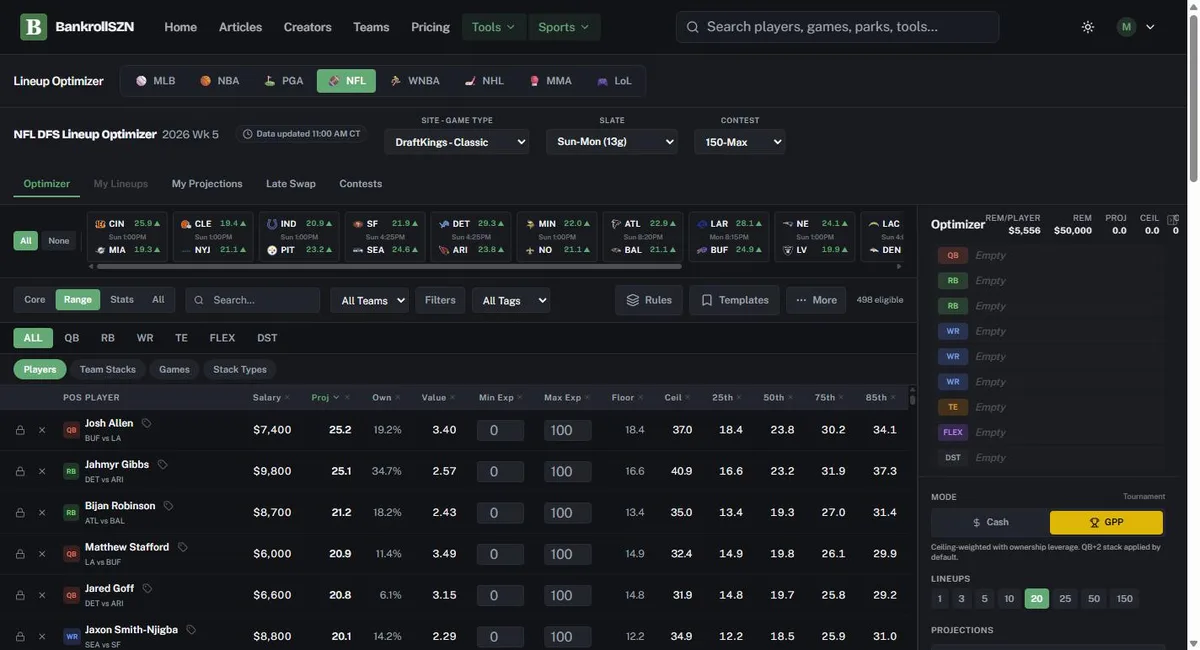
The sport bar at the top switches between MLB, NBA, PGA, NFL, WNBA, NHL, MMA and LoL. Below it, you select the site, the game type and the slate. Some sports also have a "Contest" menu.
The game ribbon shows every game on the slate. Click a game to filter the pool to it. Click "All" to show every game again.
The player pool fills the left side. Each row has a lock icon, an X icon, the salary, the projection ("Proj") and the projected ownership ("Own"). The sidebar on the right shows your lineup slots, the mode, the lineup count and the "Optimize" button.
Five Steps to Your First Build
- Select the site, the game type and the slate at the top of the page.
- Select a mode. "Cash" is for head-to-head and 50/50 contests. "GPP" is for tournaments.
- Select the number of lineups: 1, 3, 5, 10, 20, 25, 50 or 150.
- Lock the players you want in every lineup. Click X on the players you do not want.
- Click "Optimize". Then export the lineups for your site.
The DraftKings Two-Edit Rule
On DraftKings slates, the optimizer asks you to make two edits first. The sidebar shows "Lock or remove any 2 players in the pool to start." A lock, an exclude or a typed projection counts as an edit. After two edits, the sidebar shows "DK requirement met" and the "Optimize" button works.
Cash or GPP
Cash contests pay about half of the field. You win if your lineup beats the middle of the field. Use "Cash" mode and build one lineup with the highest projection.
Tournaments pay a small part of the field, and the top prizes are large. You need a lineup with high upside that few people have. Use "GPP" mode. GPP mode weights ceiling scores and penalizes high ownership.
Read the Player Pool
The pool has four column views: "Core", "Range", "Stats" and "All". "Range" is the default. It shows percentile outcomes from the 25th to the 99th. The 25th column is a bad game. The 95th and 99th columns are a great game. Use the high columns to find tournament upside.
The toolbar has "Search...", "Filters" and a tag menu. You can tag a player as "Cash", "Core", "GPP" or "Fade". Then filter the pool by tag. "Rules" adds stack and group rules. "Templates" saves your settings for later.
You can type over a projection or an ownership number in the pool. The optimizer then uses your number.
Exposure
Exposure is the percent of your lineups that use a player. Each row has "Min Exp" and "Max Exp" boxes. Set "Max Exp" to 40 and the player goes in no more than 40% of your lineups. Set "Min Exp" to 30 and the player goes in at least 30% of them.
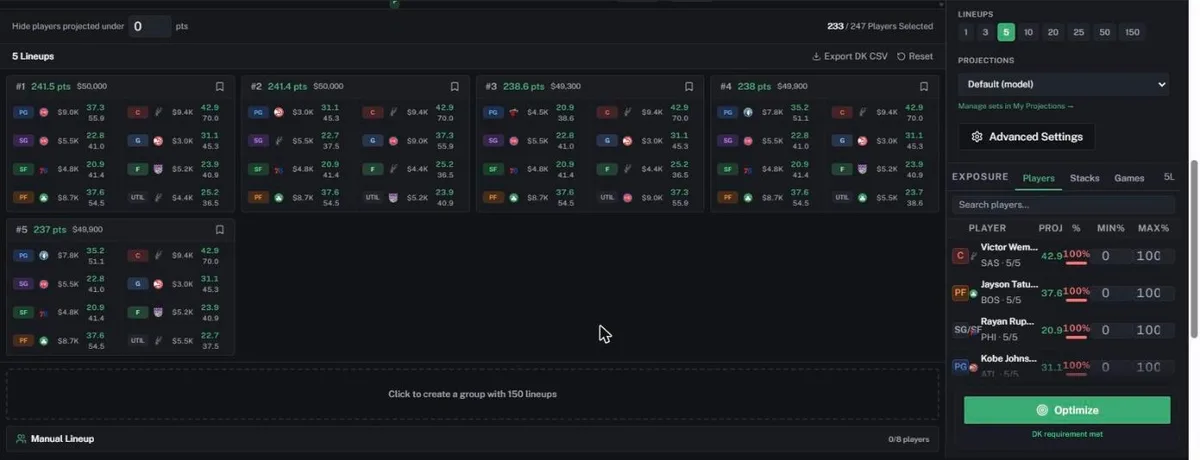
After a build, the exposure panel in the sidebar shows each player's share of your lineups. It has "Players", "Stacks" and "Games" tabs. You can set "Min%" and "Max%" there and build again.
Use Your Own Projections
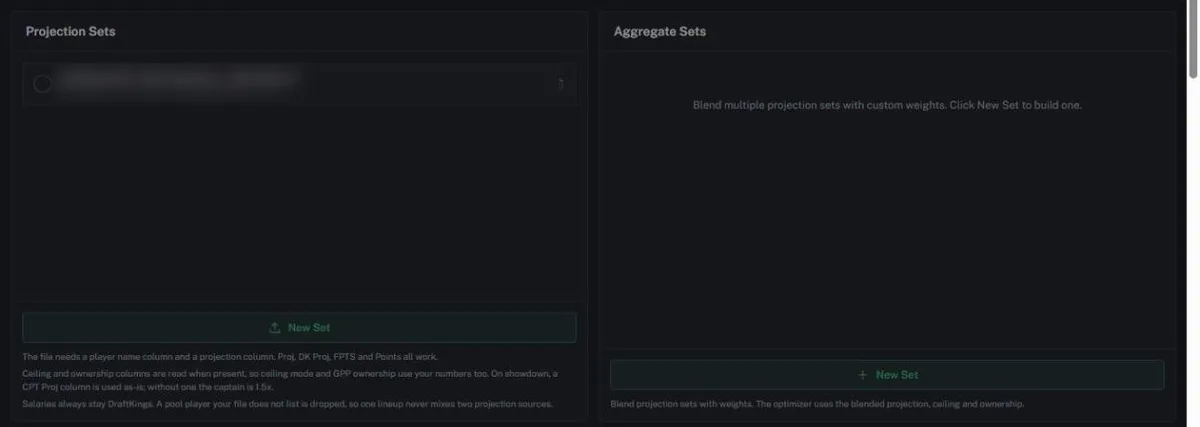
The "My Projections" tab lets you upload your own numbers. The file needs a player name column and a projection column. Headers such as "Proj", "FPTS" and "Points" work. The optimizer keeps the site salaries.
The "Aggregate Sets" panel blends two or more projection sets with weights that you choose. After you upload a set, select it in the "Projections" menu in the sidebar.
Plan Your Entries
The "Contests" tab has two panels. "DraftKings Lobby" lists the contests for the slate. "Entry Planner" takes your "Bankroll ($)" and "Slate budget ($)". Click "Suggest plan" to get a mix of contests that fits the budget.
Keep your slate budget to a small part of your bankroll. A bad night then does not end your season.
Test Your Lineups
The "My Lineups" tab keeps the lineups that you save. On classic slates, "Contest Sim" plays your lineups against a field. It shows ROI, Cash%, Top 1% and Win% for each lineup. "Keep top N by ROI" removes the weaker lineups.
Late Swap
Late Swap is for DraftKings classic slates in NFL, NBA, NHL and MLB. Games start at different times. After the first games start, you can still change players in the later games.
- Download your entries from DraftKings as DKEntries.csv.
- Open the "Late Swap" tab and click "Upload DKEntries.csv".
- Select "Quick swap" or "Full re-optimize". Click "Run late swap".
- Click "Download for DraftKings" and upload the file to DraftKings.
Correlation in Each Sport
Correlation shows how closely two players' DraftKings points rise and fall together. We measured it on our own results data. Each sport guide has the full table.
| Sport | Strongest pair | Correlation | Pair to avoid | Correlation |
|---|---|---|---|---|
| NFL | QB and his WR1 | 0.47 | DST and the other team's QB | -0.45 |
| MLB | Hitters next to each other in the order | 0.16 | A hitter and the pitcher he faces | -0.30 |
| NHL | Forwards on the same line | 0.32 | Goalie and the other team's top-6 forwards | -0.25 |
| LoL | ADC and SUP, same team | 0.86 | Two supports on opposite teams | -0.51 |
| MMA | None | Both fighters in one bout | -0.81 | |
| NBA | None (teammates -0.03) | None | ||
| WNBA | None (teammates -0.06) | None | ||
| PGA | Same tee time wave in bad weather | None |
Stack the positive pairs in tournaments. Never roster the negative pairs together. In NBA and WNBA, teammates do not help each other, so do not force them together.
Best Practices for Every Sport
- Cash games pay the steady lineup. Use projections, avoid forced stacks, and build one lineup.
- Tournaments pay the rare lineup. Use ceiling scoring, stacks that score together, and some players with lower ownership.
- Check ownership at the lineup level, not only for each player. One or two lower-owned players can make a strong lineup unique.
- Use "Unique Players", randomness and unused salary to avoid duplicate lineups, most of all on small slates.
- Do not lock too many players. Build first, check the exposure panel, then change one setting at a time.
- The default settings are a safe start, not the best settings for every contest. Use a preset when your sport has one for your contest size.
Guides for Each Sport
Each sport has different roster slots and different stack rules. Read the guide for your sport before you build:
- NFL optimizer guide: classic and showdown
- NBA optimizer guide
- WNBA optimizer guide
- NHL optimizer guide: line stacks
- MLB optimizer guide: stacks and pitchers
- PGA optimizer guide
- UFC and MMA optimizer guide
- League of Legends optimizer guide
DFS contests use real money. Only play what you can afford to lose. 21+. If you or someone you know has a gambling problem, call 1-800-GAMBLER.